
Why Pin Count Alone Doesn't Determine Laptop Screen Compatibility
When searching for a replacement laptop screen, one of the most common questions we hear is:
"My screen has a 30-pin (or 40-pin) connector. Can't I just buy any screen with the same pin count?"
The short answer is no.
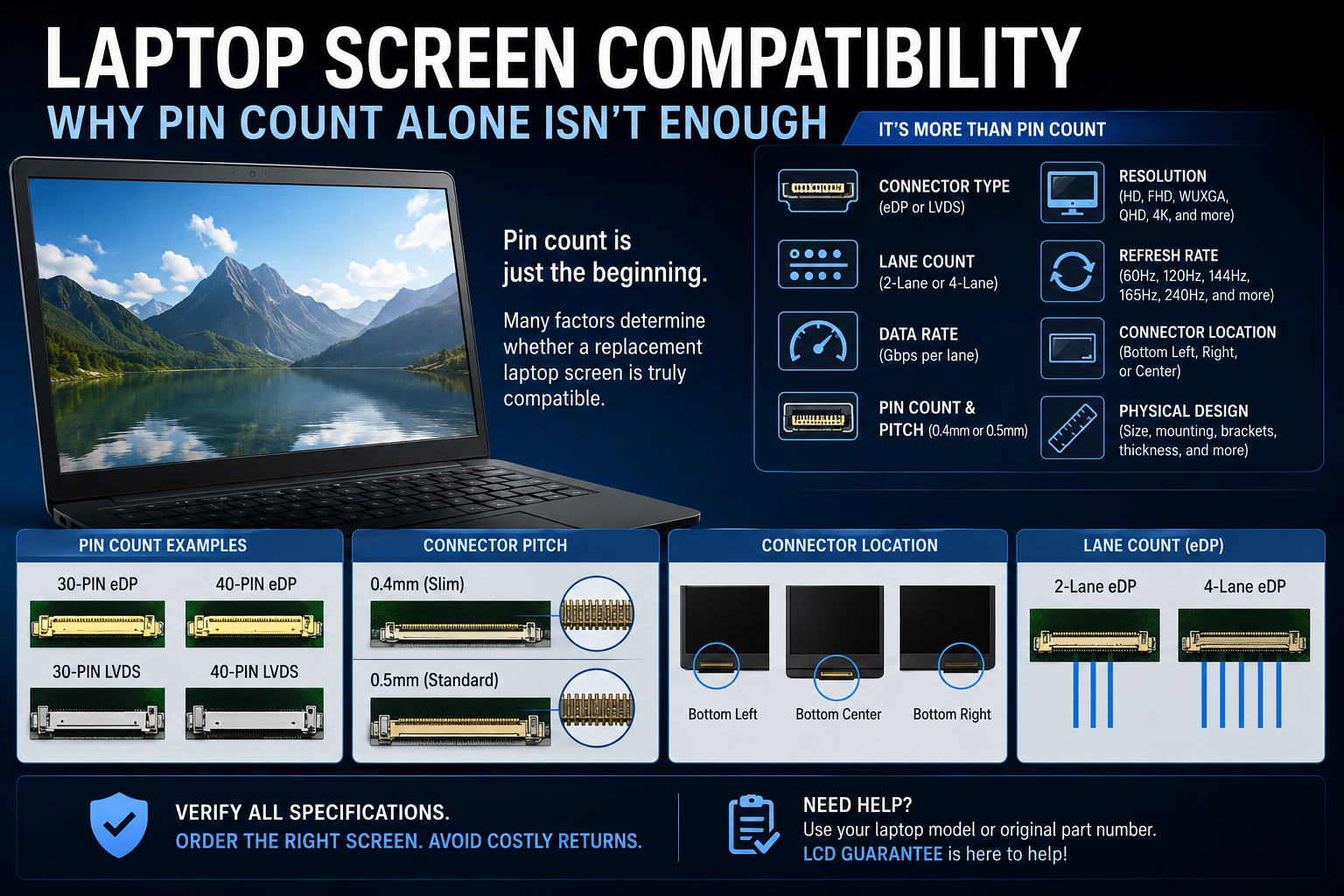
While the connector's pin count is an important part of identifying a replacement screen, it is only one of several factors that determine compatibility. Two screens may have the same number of pins but differ in connector pitch, display interface, lane configuration, data rate, resolution, refresh rate, connector location, and physical dimensions, making them completely incompatible.
Key Takeaway:
Laptop screen compatibility depends on matching both the electrical and physical specifications of the replacement display. This includes the connector type, connector pitch, display interface, lane configuration, data rate, resolution, refresh rate, connector location, physical dimensions, and the original LCD part number. Pin count alone is not enough to determine compatibility.
What You'll Learn in This Guide
Whether you're replacing a cracked laptop screen, upgrading your display, or verifying a compatible replacement LCD, this guide explains the key specifications that determine whether a replacement screen will fit and function correctly.
In this guide, you'll learn how to:
- Determine why pin count alone doesn't guarantee compatibility.
- Understand the differences between 30-pin and 40-pin connectors.
- Compare eDP and LVDS display interfaces.
- Identify why connector pitch, lane count, and data rate matter.
- Verify compatibility based on resolution, refresh rate, connector location, and physical dimensions.
- Use the original LCD part number to identify the correct replacement screen.
- Take advantage of LCD Guarantee's free screen matching service.
What Is Pin Count?
Pin count refers to the number of electrical contacts in the display connector.
The most common laptop display connectors include:
-
30-pin LVDS
-
30-pin eDP
-
40-pin LVDS
-
40-pin eDP
Although these connectors may have the same number of pins, they are not necessarily compatible. Two connectors with the same pin count may use different technologies, different connector pitches, different signaling methods, or different electrical requirements.
That's why pin count should only be considered a starting point when identifying a replacement screen.
Pin Count Doesn't Tell You the Connector Pitch
Even when two screens have the same number of pins, the spacing between those pins—known as the connector pitch—may be different.
The two most common connector pitches used on laptop LCD screens are:
-
0.4 mm pitch (commonly called a slim connector)
-
0.5 mm pitch (standard connector)
Although both connectors may have 40 pins, they are physically different sizes.
A 0.4 mm slim connector is narrower and more compact because the pins are spaced closer together. A 0.5 mm standard connector has wider pin spacing, making the connector physically larger.
Because of this, a display cable designed for one connector pitch will not fit the other, even though both connectors have the same number of pins.
This is one of the most common reasons customers accidentally order the wrong replacement screen. Matching the pin count alone isn't enough—you must also verify the connector pitch.
Why Pin Count Isn't Enough
A matching connector only tells you that the cable may physically connect to the display. It doesn't guarantee that the screen will communicate properly with your laptop or even fit inside the display assembly.
Several important specifications must also match.
Display Interface
One of the biggest differences is the display interface.
Both 30-pin and 40-pin connectors can be found in LVDS and eDP configurations. While the connectors may have the same number of pins, LVDS and eDP use completely different signaling technologies and are not interchangeable.
Connecting the wrong interface can result in a blank display, image corruption, or a screen that simply isn't recognized by the laptop.
eDP Lane Count and Data Rate
Modern eDP (Embedded DisplayPort) displays communicate using one or more data lanes. Common configurations include:
-
2-lane eDP
-
4-lane eDP
Higher-resolution and higher-refresh-rate displays require more bandwidth, which is why they often use additional lanes.
In addition to lane count, eDP displays also operate at different data rates, measured in Gbps (gigabits per second) per lane. As display technology has advanced, newer panels require faster signaling speeds to support higher resolutions, faster refresh rates, HDR, and other advanced display features.
For example, a Full HD (FHD) 60Hz display may operate using fewer lanes and a lower data rate, while a QHD 165Hz or UHD (4K) display may require a 4-lane, high-speed eDP connection.
Even if two screens have the same:
-
Pin count
-
Connector pitch
-
Connector location
they may still be incompatible if the laptop, display cable, or graphics hardware does not support the required lane configuration or data rate.
Resolution and Refresh Rate
One of the biggest factors affecting compatibility is the combination of a screen's resolution and refresh rate.
Laptop displays have been manufactured in many different resolutions and refresh rates over the years. Some of the more common resolutions include:
-
1366 × 768 (HD)
-
1600 × 900 (HD+)
-
1920 × 1080 (Full HD / FHD)
-
1920 × 1200 (WUXGA)
-
2560 × 1440 (QHD)
-
2560 × 1600 (WQXGA)
-
2880 × 1800 (2.8K)
-
3200 × 1800 (QHD+)
-
3840 × 2160 (UHD / 4K)
Likewise, laptop panels are available in many refresh rates, including but not limited to:
-
60Hz
-
90Hz
-
120Hz
-
144Hz
-
165Hz
-
240Hz
-
300Hz
-
360Hz
-
480Hz
These are just some of the more common examples. Manufacturers continue to introduce new panel resolutions and refresh rates as display technology evolves.
In general, most standard 60Hz HD, Full HD (FHD), and WUXGA laptop displays use a 30-pin eDP connector. Many displays with higher resolutions or higher refresh rates use a 40-pin eDP connector to provide the additional bandwidth required by the panel.
Because of this, a laptop that originally shipped with a 30-pin display cable typically cannot be upgraded to a display that requires a 40-pin connector without replacing the display cable. Depending on the laptop model, additional components or motherboard support may also be required.
Likewise, a laptop designed with a 40-pin display cable generally cannot be downgraded to a 30-pin display because the connectors are physically different and the existing display cable will not connect to the panel.
While there are exceptions depending on the laptop model and LCD panel, the original display cable installed by the manufacturer is one of the most important factors in determining compatibility. The display cable is designed to support the screen configuration that the laptop originally shipped with.
Installing a screen that requires a different connector or cable configuration can result in:
-
No image
-
Flickering
-
Distorted graphics
-
The display not being detected
-
A display cable that simply does not fit
Connector Location
Even when the connector type, pin count, connector pitch, and interface all match, the connector may be located in a different position on the back of the panel.
Common locations include:
-
Bottom left
-
Bottom right
-
Bottom center
If the connector is in a different location, your existing display cable may not reach properly or may be routed incorrectly, making installation impossible.
Physical Design
Not every screen with the same diagonal size is built the same way.
Differences may include:
-
Mounting brackets
-
Mounting tabs
-
Slim or standard panel thickness
-
Overall dimensions
-
Screw locations
A screen that is electrically compatible may still not fit properly inside the laptop lid.
Touch vs. Non-Touch
Touchscreen and non-touchscreen laptops often use different display assemblies, display cables, and mounting systems.
Even if the LCD connector appears identical, a touchscreen assembly cannot always be replaced with a non-touch screen without replacing additional components.
Why Part Numbers Matter
The most reliable way to identify a compatible replacement screen is by using the original LCD manufacturer's part number or your laptop's exact model number.
Laptop manufacturers often source compatible panels from companies such as:
-
AUO
-
BOE
-
Innolux
-
LG Display
-
Sharp
-
Samsung
Although these manufacturers produce different LCD part numbers, each approved panel meets the specifications required for that particular laptop model.
Professional screen matching verifies much more than the connector. It checks the connector pitch, display interface, lane configuration, data rate, resolution, refresh rate, connector location, mounting style, physical dimensions, and other critical specifications before determining compatibility.
Did You Know?
We've seen countless replacement screens returned because the customer matched only the pin count. In many cases, the connector looked identical, but differences in connector pitch, display interface, lane configuration, panel specifications, or physical dimensions made the screen incompatible.
That's why professional screen matching always considers all of the display's specifications—not just the connector.
Laptop Screen Compatibility Checklist
When identifying a replacement laptop screen, these are the key specifications that should be verified:
| Specification | Why It Matters |
|---|---|
| Pin Count | Determines the number of electrical contacts in the connector, but does not guarantee compatibility. |
| Connector Pitch (0.4 mm or 0.5 mm) | Ensures the display cable physically fits the connector. A 0.4 mm (slim) connector and a 0.5 mm (standard) connector are not interchangeable. |
| Display Interface (LVDS or eDP) | Determines how the laptop communicates with the display. LVDS and eDP use different signaling technologies and cannot be interchanged. |
| eDP Lane Count | Determines how many data lanes are available to transmit video. Common configurations include 2-lane and 4-lane eDP. |
| Data Rate (Gbps per Lane) | Higher resolutions and refresh rates require greater bandwidth. The laptop, display cable, and LCD panel must all support the required data rate. |
| Resolution | The replacement panel must support the correct native resolution for the system and cable configuration. |
| Refresh Rate | High-refresh displays often require different hardware support than standard 60Hz panels. |
| Connector Location | The display cable must reach the connector. The connector may be located at the bottom left, bottom right, or bottom center depending on the panel. |
| Physical Dimensions | Even screens with the same diagonal size may have different widths, heights, thicknesses, or bezel designs. |
| Mounting Style | Side brackets, top/bottom tabs, adhesive mounting, or bracketless designs all affect whether the screen will install correctly. |
| Touch or Non-Touch | Touchscreen assemblies often use different cables, mounting systems, and components than non-touch models. |
| Manufacturer Part Number | The original LCD part number is the most reliable way to identify a compatible replacement or approved compatible equivalent. |
No single specification determines compatibility on its own. A replacement screen must be evaluated using all of these factors to ensure it fits properly and functions correctly.
Don't Guess Based on the Connector
Using pin count alone is one of the most common reasons customers order the wrong replacement screen.
A 30-pin or 40-pin connector is only the starting point. To ensure compatibility, you should also verify:
-
Pin count
-
Connector pitch (0.4 mm or 0.5 mm)
-
Display interface (LVDS or eDP)
-
eDP lane count (when applicable)
-
Supported data rate (Gbps per lane)
-
Resolution
-
Refresh rate
-
Connector location
-
Physical dimensions
-
Mounting style
-
Original LCD part number
Matching all of these specifications helps ensure the replacement screen will fit correctly and function as intended.
Need Help Finding the Right Screen?
At LCD Guarantee, we offer a free screen matching service. Simply provide your laptop model number or the manufacturer part number printed on the back of your original screen, and our team will identify a compatible replacement before you place your order.
Ordering the correct screen the first time saves time, money, and frustration. While pin count is an important starting point, true compatibility depends on matching the complete set of electrical and physical specifications—not just the connector. When in doubt, verify the original LCD part number or contact our team for a free compatibility check before placing your order.